
A guide to using CommuniFilms
About
CommuniFilms is a social platform dedicated to emerging audiovisual creation. It gives visibility to audiovisual works (features, short films, series and music videos) and brings together those who initiate, produce and make them. With CommuniFilms, everyone builds their filmography, connects with others and assembles the teams for their future projects — whether you direct, work in a technical role, work in a related field, or are simply curious about film.
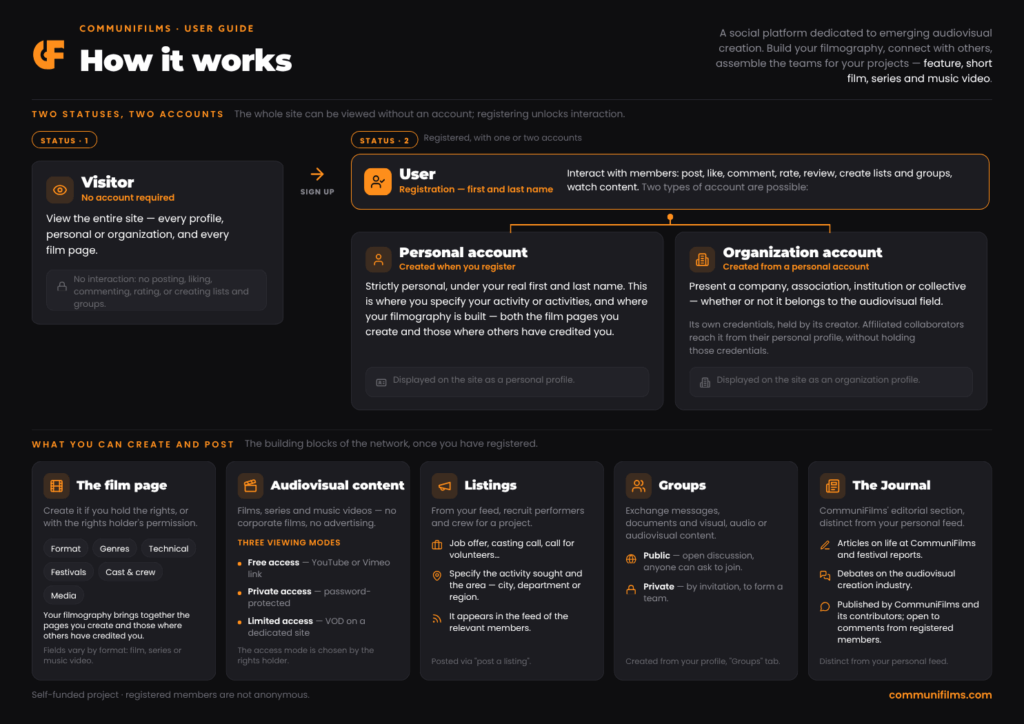
Statuses and accounts
Access to CommuniFilms is based on two statuses. Visitor status requires no registration and allows you to view everything. User status is obtained by creating an account and allows you to take part in the network.
There are two types of account: the personal account, created when you register, and the organization account, which has its own credentials and is created from a personal account. Each is displayed on the Site as a profile — the page others see.
Visitor status
The whole of CommuniFilms is accessible without creating an account. As a Visitor, you can view every profile (personal or organization) and every film page (feature, short film, series and music video), but you cannot take part in the network or interact with members: you cannot post a message or a listing, like, comment, rate, leave a review, create lists or groups, or view content with restricted access.
User status
User status is obtained by registering. On CommuniFilms, members are not anonymous: you identify yourself with your first and last name. You can then interact with other members — post a message or a listing, like, comment, rate, leave a review, create lists or groups, view content — whether you took part in a film, a series or a music video, work in a related field (media, institutions…), or are simply a viewer.
With your account, you can create:
- film pages;
- lists of films, series or music videos (favorites, watch list…);
- work groups (private) or discussion groups (public);
- listings.
You can also post:
- notes and reviews of films, series or music videos;
- messages on your feed;
- listings (job offer, casting call, call for volunteers…).
The personal account
The personal account is the one you create when you register: it is the entry point for every User. It is strictly personal and identifies you under your real first and last name.
This is where you specify your activity or activities, whether or not they relate to film, and where your filmography is built: it brings together both the film pages you create and those where others have credited you.
The Organization account
You can create an organization account to present your company, association, institution or collective, whether or not it belongs to the audiovisual field. It can only be created from a personal account: there is no standalone organization account.
Once created, it has its own login credentials. You can also reach it directly from your personal profile, without having to enter them.
You can affiliate your collaborators to the organization by sending them an invitation on their personal profile. They then reach the organization account from their own profile, without holding its credentials: those remain yours alone.
The film page
To create a film page, you must be the rights holder (producer) of the content or, if you are a member of the crew, confirm that you have the rights holder’s permission. You can fill in:
- the format (feature, short film, series or music video);
- the genre or genres the film, series or music video belongs to;
- the technical details (running time, country, production, synopsis…);
- festival selections and awards;
- the cast and crew (whom you can email to invite them to join CommuniFilms);
- the media (poster, photos, trailer, the film, series or music video itself, and any other audiovisual content).
NB: the fields to fill in vary by format: film (short or feature), music video or series.
Audiovisual content
CommuniFilms is here to promote audiovisual creation and therefore limits its content to films (feature, medium or short), series (TV series or web series) and music videos. Work that falls under audiovisual services (corporate films or advertising) is not part of CommuniFilms’ content.
Depending on the rights holder’s wishes, audiovisual content can be viewed:
- either freely, via a YouTube or Vimeo link;
- or privately, password-protected and authorized only by the rights holder;
- or with limited access, available on demand on a dedicated streaming site.
Listings
When posting a message on your feed, you can choose to “post a listing”, mainly to look for performers and crew members for an audiovisual project. You must specify the activity sought and the area concerned (city, department or region) so that the listing appears in the feed of the relevant members.
The Journal
The Journal is CommuniFilms’ editorial section, distinct from your personal feed. It features articles about CommuniFilms, festival reports and discussions about the audiovisual creation sector, published by the CommuniFilms team or by people it authorizes to contribute. You can comment on Journal articles like other content on the Site.
Groups
You can create a group from your profile by clicking “Groups”, or via “My groups” by hovering over your account tab. There you can exchange messages, as well as documents and visual, audio or audiovisual content. Two types of group are possible:
- the public “discussion” group: its name is visible to all members and anyone can ask to join. These groups bring together people who want to talk about particular themes or topics;
- the private “work” group: its existence is known only to the members invited to join. These groups are mainly used to form a team for a specific task (location scouting, pre-production, shooting…).